

How To Use Twitter’s Campaign Planner
You’ve probably all done it: launched an ad campaign only to find it didn’t quite hit the spot. Perhaps you didn’t quite reach the audience you wanted to, and the ads didn’t convert the way you hoped.
It’s a waste of time and money, isn’t it? So wouldn’t it be good if there was a simple tool that could help you forecast your ad campaigns before putting them out there?
Well, there is.
It’s called the Twitter Campaign Planner, and it could make all the difference to your success if you want to grow your business with Twitter.
How does the Twitter campaign planner work? Read on, because I will talk you through it and explain what it could do for your marketing plans.
What Is Twitter Campaign Planner?
Twitter’s campaign planner lets you forecast your advertising results before going live with your ads by using a set of estimation tools.
You can use Twitter’s campaign planner to estimate:
- Forecast reach
- Impressions
- Average frequency
- CPM
It also takes into consideration your:
- Audience
- Campaign duration
- Frequency setting
- Ad placement
- Budget for auction-based campaigns
It’s not open to everyone, though.
Currently, Twitter is only offering it to managed partners (official companies that Twitter partners with), and it’s available only in the United States, United Kingdom, and Japan. However, it does have expansion plans.
With this said, although the campaign planner isn’t widely available yet, by finding out more about it now, you can understand other users’ experiences and the potential this could have for testing your own ads.
How Does Twitter’s Campaign Planner Work?
As I’ve mentioned, the new feature could be a game changer for advertisers who want to test campaigns before launching live.
As Jon Morgenstern, Senior Vice President and Head of Investment, VaynerMedia, who has trialed the planner, said:
‘With Campaign Planner, our teams are better able to forecast campaign performance outcomes prior to going live, helping ensure our Twitter activations are set up for measurable success out of the gate…’
Want to test it out for yourself?
To try it, you can find the Twitter campaign planner under your Twitter account.
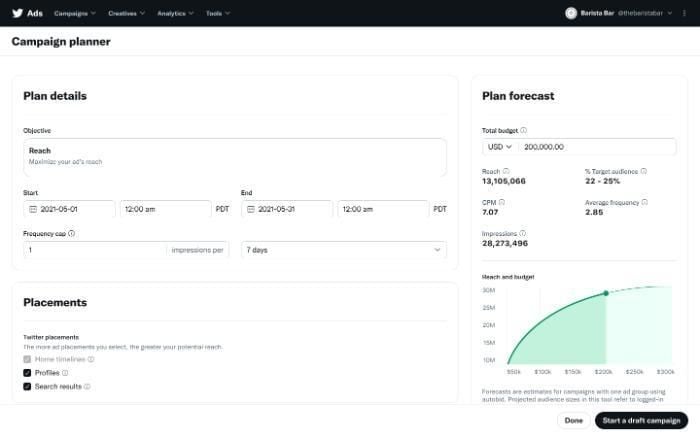
Here, you enter the details of your campaign, such as:
- Objective(optimizing your campaign’s reach)
- Your start and finish dates
- Frequency cap (How many impressions/days)
- Placements (search results or Twitter profile)
You then get a forecast predicting:
- Reach
- Target audience
- CPM (cost per mille, or cost per thousand impressions)
- Average frequency
- Impressions (how often advertisements get served on a page)
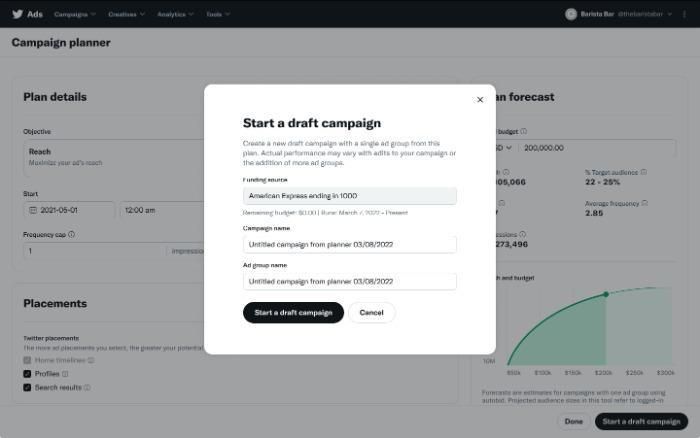
As pictured below, you can also set up a draft campaign.
Is Twitter Campaign Planner a Good Fit for Your Business?
It depends on several factors, including the stage of your business. However, you should also consider that the results are merely estimates, and you won’t necessarily see the predicted results.
That aside, here are a few scenarios that might make this new tool a good fit for you:
- If you’re a new company with a limited budget, you may want to use the Twitter campaign planner before committing money to live ads.
- An established business looking to break into a fresh niche. You could use Twitter’s campaign planner for a test run before launching any ads.
- Perhaps you’re new to Twitter advertising and unsure where to place your ads or how to long run your campaign. You can test out advertising in your profile and search advertising to view your potential results and vary lengths to get an idea of the likely results; if you are new to all this, my guide to Twitter ads will get you off to a running start.
- Do your ads reach your target audience? That’s something else you can establish with the new tool.
If it works, you keep spending on those areas. If it doesn’t, you would go back to the Twitter campaign planner and try a different strategy.
However, because this Twitter tool is still in the early stages of rollout and isn’t available to vast numbers of advertisers, it’s probably a good idea to watch and wait. See how others are using the tool, what it’s doing for their success rates, and learn from case studies.
As the campaign planner reaches a wider audience and is more accessible, then you can start to get a better idea of how it could work for you and ways to apply it.
How To Set Up Twitter Campaign Planner
Are you ready to get started with Twitter’s campaign planner? It’s simple. All you’ve got to do is follow these step-by-step instructions.
Go to the campaigns drop-down menu in the left-hand corner and find the ‘Campaign planner’ option.
- Fill out your Plan Details, including your aims, budget, beginning and end dates, and a frequency cap (how often people can see your ads).
- Next, go to placements to choose where you want your ads to appear. Twitter sets ‘Home Timelines’ as a default, so you can’t move it. You can also choose to include your ads in profiles and search results.
- Now, select your demographics. Which group(s) of people are you trying to reach? You can choose from demographics like age, language, gender, and location. However, the Twitter campaign planner ‘only supports country-level targeting in the United States, United Kingdom, and Japan,’ and language targeting is optional.
- Next, it’s time to choose your devices. This step is optional, and you can select from the operating system, carrier, and device model.
- Customizing your audience is another optional step. Custom audiences allow you to focus on existing followers to develop re-marketing campaigns. You can target people by website or app activity, app activity combination audiences, and lists.
- Targeting features (optional) Here, you can target by keywords, interests, look-alikes, etc.
- With all your information completed, select the ‘Start a draft campaign’ button and choose a funding source. You also need to give your new campaign and ad group a name. With that done, click on ‘Start a draft campaign’ to save everything and to copy your settings over.
When you look at the plan forecast, you can:
- Make adjustments to your budget.
- Select another currency.
- Adjust the reach and budget curve. This is done by hovering along the pictured curve to see your estimated impressions and the potential reach that is possible if you change your budget. If you click on the curve, it moves the selected point to that budget level.

Integrating Planner Into Your Twitter Campaigns
Perhaps you’re an e-commerce company specializing in bridal flowers and want an efficient way to run campaigns. Trialing ads with Twitter’s campaign planner could be just what you’re looking for.
Here are some potential ways you could use it.
- The first thing you could view is whether advertising on Twitter would increase your reach and impressions. From there, you could determine if launching a live ad may be the way forward.
- Then you could test location or maybe interests and keywords to analyze whether this could get your ads in front of your ideal audience.
- Frequency and reach are other elements you could try to see how this might increase brand awareness or campaign lengths to see if you could build further awareness of your business.
However, as I stressed in the last section, you don’t need to start making decisions about using the campaign planner yet. Learn all you can from others’ success, and when the tool becomes available to you, use their experiences as a guide.
FAQs
The Twitter campaign planner allows you to test your advertising campaigns before launching them live. It forecasts the likely results, and you can test core areas, including impressions and reach. Twitter released the tool in late 2021 to a limited audience and it plans a wider release at some point.
You can edit the campaign while it’s in draft.
The Twitter Campaign Planner has a minimum budget of $1,000 or the equivalent in the marketer’s chosen currency.
The minimum length is three days.
Conclusion
Even if marketers have an ample budget, they don’t want to waste their time or money on ineffective ads that don’t grow their business.
However, unless you’re familiar with Twitter ads and how to run them, there’s always a chance your ads will fall flat.
The Twitter campaign planner hopes to change all that by giving advertisers a prediction of the possible results.
With a better idea of what to expect, marketers can launch their ads confidently or tweak them and try again.
Although the Twitter campaign planner isn’t open to everyone at the moment, you’ve got plenty of opportunities to learn from others and how it works for them.
Would you use the Twitter campaign planner?

See How My Agency Can Drive Massive Amounts of Traffic to Your Website
- SEO – unlock massive amounts of SEO traffic. See real results.
- Content Marketing – our team creates epic content that will get shared, get links, and attract traffic.
- Paid Media – effective paid strategies with clear ROI.
Book a Call