HubSpot Lead Scoring 101: Finding Quality Leads
You’ve heard the old adage: quality over quantity. You might have a torrent of leads coming in, but the excitement fades quickly when few are actually turning into paying customers.
On the marketing side, you know there’s little point in getting leads when they’re not going to close.
Enter HubSpot lead scoring. Lead scoring in HubSpot helps aligns your marketing and sales team, and gives you a way to focus on the quality of leads in your pipeline, not just the quantity.
What is lead scoring?
Lead scoring is the art of using data to rank your prospects in order to determine how ready they are for the next step in the sales process. It’s a scoring system shared by your sales and marketing teams that’s based on your contact’s actions and their fit for your business.
Among other things, lead scores can be used to automate which contacts go in a given Active List, and where they fit into your marketing workflows. Lead scores are also a good indicator of whether a lead is ready to enter a more targeted HubSpot sales sequence.
A lead score is typically determined by a variety of criteria, including different contact attributes, and how contacts interact with your content. This may include things like email clicks, content downloads, funnel stage, and more. Lead scoring is more likely to lead to conversions once you’ve built a strategic content funnel, and have a system to classify leads by buyer persona.
In a nutshell, lead scoring indicates how ready a lead is to say “yes” when sales makes the move.
Types of lead scoring
HubSpot has some great tools to help you score your leads, whether you want to do it automatically or manually. How HubSpot lead scoring is calculated depends on which type of lead scoring model you use:
Predictive Lead Scoring: Predictive lead scoring in HubSpot uses their proprietary AI-based algorithm to automatically calculate a score for leads based on their potential to become a customer. To use this method of lead scoring, there needs to be a minimum amount of lead information gathered and input into the model in advance.This is available in enterprise level only.
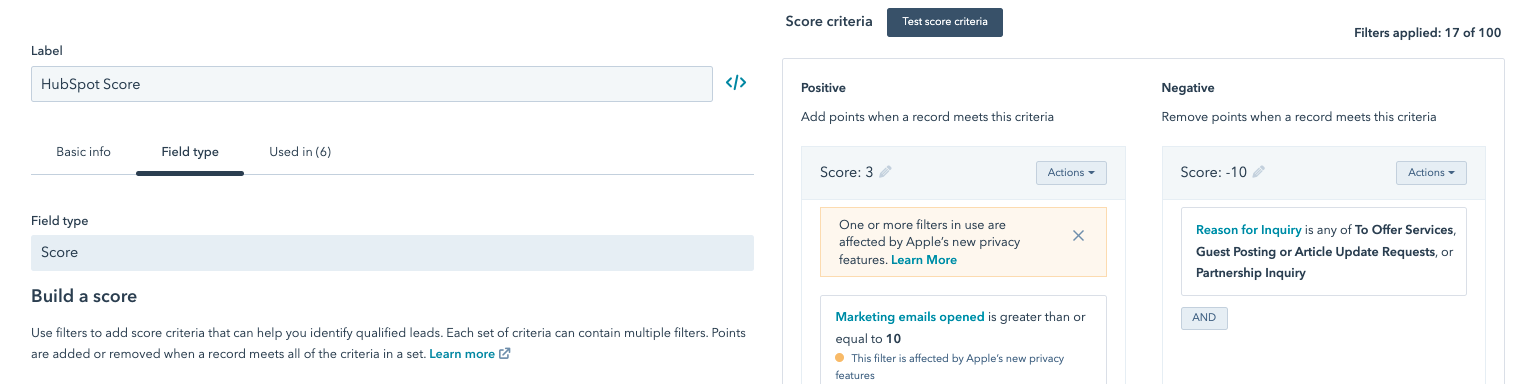
Manual Lead Scoring: Manual lead scoring in HubSpot allows you to calculate a score based on a model that you create, with attributes and actions that you identify as indications that the lead is qualified.
Let’s explore the two more in depth.
What is predictive lead scoring?
Predictive scoring in HubSpot uses advanced algorithms and machine learning to analyze and determine how likely a lead is to close as a customer within 90 days, based on weighted criteria.
In HubSpot, Enterprise users can see this score by going to Settings > Properties. The information is broken down into two different categories: Likelihood to close and Contact priority.
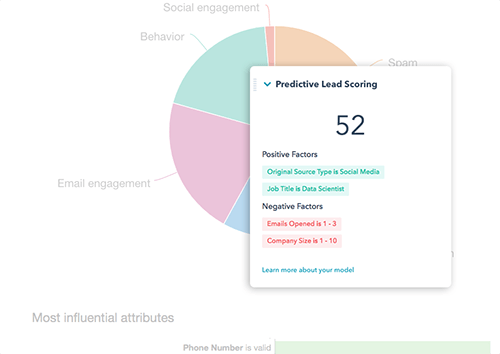
An example of a lead score using predictive lead scoring
Likelihood to close is a HubSpot lead score that shows the probability of a contact closing based on contact properties and behaviors. A contact with a score of 45 will have a 45% chance of closing in the next 90 days. In other words, a higher percentage means a better opportunity to close.
Contact priority is a HubSpot lead score indicated by Very High, High, Medium and Low scores, and these categories give your sales team an easy way to filter based on the Likelihood to close score.
HubSpot’s algorithm looks at contact information that is available in the CRM and/or Marketing Hub such as demographics, website interactions, and company information, as well as historical information about what leads have become customers to determine this rating.
HubSpot Lead Score vs. Lead Status
It’s important to note that a HubSpot lead score is different from “lead status.”
While lead score is more for inbound marketing and indicates how qualified a lead is, lead status is a contact property that describes the state of the sales process with each lead, and supplements the info in their lifecycle stage.
A score could be 150. And once a lead hits 150, it’s ready for a conversation.
A lead status could be “attempting to contact” as a sales rep is trying to reach a person that they believe is ready for a sales conversation.
The lead status property uses terms such as “Open Deal,” “Unqualified,” and “Attempted to Contact.” You can watch our lead status video for a more comprehensive explanation of this.
Setting up manual lead scoring in HubSpot
The other lead scoring option in HubSpot is manual lead scoring. It can be an invaluable tool for your marketing and sales teams if you invest the time and energy to do it correctly.
Rather than making guesses or basing your decisions entirely on intuition, take the time to look at the numbers and base your lead score on the quantitative data as well. Let’s go over a few lead scoring best practices when you’re getting set up to do it manually.
Find your lead-to-customer conversion rate
If you don’t know where you are, it’s hard to know where you’re going. Start by looking at how many leads you get each month and how many of those convert into customers. Divide the number of new customers by the number of leads, and you have your conversion rate. This gives you a starting point as you build your lead score.
Determine what makes someone convert.
There’s a lot of information to sort through and decisions to make as you create your lead score. So, how do you decide what to include?
1. Start by looking at the data.
What content have you created that historically converts prospects into leads? Which industries are more likely to close a deal? How is your inbound lead follow-up process?
Take a close look at your reporting and use it to determine which content works (and which doesn’t). If you have access to custom reports in HubSpot, you can run an attribution report that shows what content your visitors interacted with at different stages, whether their first interaction or their most recent.
For example:
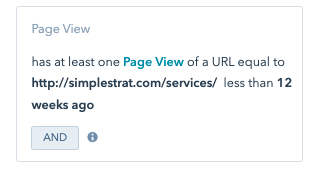
Tip: you may want to learn more about building trust via content, which occurs before you’ve even made contact with B2B prospects.
Some attributes to consider for your lead scoring model include:
- Demographics
- Company information
- Email engagement
- Social engagement
- Website engagement
- Negative engagement (what keeps someone from closing?)
2. Talk to your sales team
Your sales team is a wealth of information when it comes to what makes a successful lead, from what generates conversions to which customers bring the most revenue.
Ask the sales team what blogs or content they send to leads, and what responses they hear from these individuals. Use their qualitative insights to support what you’ve uncovered in the data.

3. Talk to your customers.
Don’t forget to talk to your current customers about what impacted their journey with your company. This could be a survey that you send out or individual calls with top customers.
Ask them what questions they asked as they made a decision to purchase from your business and what resources were helpful along the way.
How to set up Lead Scoring in HubSpot
Once you’ve done the research, you’re ready to create your lead score! Go to Settings > Properties in your HubSpot account and search for the HubSpot Score property.
Add the properties that have a positive impact on your close rates and then the attributes that negatively impact a contact’s likelihood to purchase from your company, up to 100 attributes. You can create custom score properties for contacts, companies, and deals.
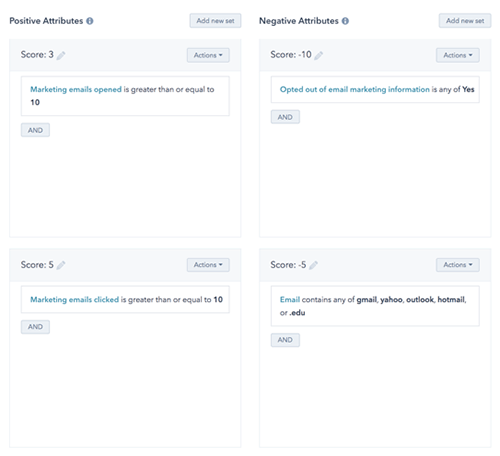
Keep in mind that you can use negative attributes to keep leads out of your funnel and away from your team’s attention. This may include those who submit inquiries about your career opportunities or individuals who are trying to sell services by spamming your forms.
Track Your Success and Revise Your Score
After you set up your lead scoring, don’t set it and forget it. Test your results and compare it to the lead-to-conversion rate you had when you started. As you add new resources or discover new insights about your customer, your lead score might shift as well.
Benefits of HubSpot Lead Scoring
It takes time and energy to create the methodology behind your lead score. However, implementing lead scoring properties is pretty straight forward once you’ve done all the hard work. HubSpot’s software makes it easy to put your lead score into action and let data help you decide which contacts are worth investing time on.
Keep in mind though that HubSpot is just a tool. The real value of lead scoring comes by bringing increased alignment between your sales and marketing teams.
By working together to create a lead score, you not only have a common goal and better information sharing, but more qualified leads for your sales team, too.